摘要:在本教程中,您將學習如何使用 SQL LTRIM 函式返回一個從字串開頭移除了指定字元的新字串。
SQL LTRIM 函式簡介 #
LTRIM 函式接收一個字串,並返回一個從輸入字串開頭移除了指定字元的新字串。
下面是 LTRIM 函式的語法:
LTRIM(string, [trim_characters])Code language: SQL (Structured Query Language) (sql)LTRIM 函式接受兩個引數:
string:您想要從中移除前導字元的輸入字串。trim_characters:(可選)您想要修剪的字元組成的字串。如果省略trim_characters,該函式將預設移除空格。
LTRIM 函式返回一個從輸入字串中移除了所有 trim_characters 的新字串。它不會修改原始字串。
在實踐中,您會發現 LTRIM 函式在清理用於查詢或字串轉換的字串資料時非常有用。
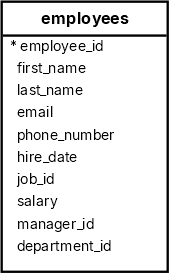
我們將使用 HR 示例資料庫中的 employees 表來演示 LTRIM 函式:
移除前導空格 #
首先,向 employees 表新增一個新行,其名字和姓氏都帶有一個前導空格:
INSERT INTO
  employees (
    employee_id,
    first_name,
    last_name,
    email,
    phone_number,
    hire_date,
    job_id,
    salary,
    manager_id,
    department_id
  )
VALUES
  (
    306,
    ' John',
    ' Doe',
    '[email protected]',
    '#515.123.8191',
    '1994-06-07',
    1,
    8500.00,
    205,
    11
);Code language: SQL (Structured Query Language) (sql)其次,選擇 first_name 以空格開頭的員工:
SELECT
  first_name,
  LTRIM(first_name) AS trimmed_name
FROM
  employees
WHERE
first_name LIKE ' %';Code language: SQL (Structured Query Language) (sql)輸出
 first_name | trimmed_name
------------+--------------
  John      | JohnCode language: SQL (Structured Query Language) (sql)
在這個查詢中:
第三,從 first_name 列中移除前導空格:
UPDATE employees
SET
  first_name = LTRIM(first_name)
WHERE
first_name LIKE ' %';Code language: SQL (Structured Query Language) (sql)移除特定字元 #
以下查詢返回員工 ID 為 306 的名字和電話號碼,其中電話號碼 phone_number 的前導字元 # 已被移除:
SELECT
  first_name,
  phone_number,
  LTRIM(phone_number, '#') AS plain_phone_number
FROM
  employees
WHERE
employee_id = 306;Code language: SQL (Structured Query Language) (sql)輸出
 first_name | phone_number  | plain_phone_number
------------+---------------+--------------------
 John       | #515.123.8191 | 515.123.8191Code language: SQL (Structured Query Language) (sql)
在此示例中,我們使用 LTRIM 函式從電話號碼的開頭修剪字元 #。
您可以在 UPDATE 語句中使用 LTRIM 函式從電話號碼中移除字元 #:
UPDATE employees
SET
  phone_number = LTRIM(phone_number, '#')
WHERE
employee_id = 306;Code language: SQL (Structured Query Language) (sql)在條件邏輯中使用 LTRIM 函式 #
以下查詢使用 LTRIM 來標記那些姓氏包含前導空格的員工:
SELECT
  employee_id,
  last_name,
  CASE
    WHEN last_name != LTRIM(last_name) THEN 'Has leading spaces'
    ELSE 'No leading spaces'
  END AS status
FROM
  employees
ORDER BY
last_name;Code language: SQL (Structured Query Language) (sql)摘要 #
- 使用
LTRIM函式返回一個從輸入字串中移除了指定字元的新字串。 - 如果您省略 trim_characters,
LTRIM函式將預設移除前導空格。
資料庫 #
本教程是否有幫助?

